
Editable DataGrid
Extension » Editable DataGrid
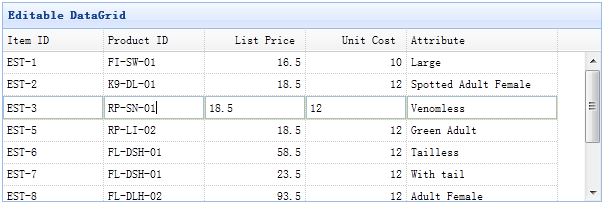
Usage Example
Create datagrid in html tag
Make it editable
Now you can double click the datagrid row to begin edit operation. You can also set the saveUrl,updateUrl,destroyUrl properties to automatic synchronization data from client to server.
Properties
The properties extend from datagrid, below is the added properties for edatagrid.
| Name | Type | Description | Default |
|---|---|---|---|
| destroyMsg | object | The confirm dialog message to display while destroying a row. |
destroyMsg:{
	norecord:{	// when no record is selected
		title:'Warning',
		msg:'No record is selected.'
	},
	confirm:{	// when select a row
		title:'Confirm',
		msg:'Are you sure you want to delete?'
	}
}
|
| autoSave | boolean | True to auto save the editing row when click out of datagrid. | false |
| url | string | A URL to retrieve data from server. | null |
| saveUrl | string | A URL to save data to server and return the added row. | null |
| updateUrl | string | A URL to update data to server and return the updated row. | null |
| destroyUrl | string | A URL to post 'id' parameter to server to destroy that row. | null |
| tree | selector | The tree selector to show the corresponding tree component. | null |
| treeUrl | string | A URL to retrieve the tree data. | null |
| treeDndUrl | string | A URL to process the drag and drop operation. | null |
| treeTextField | string | Defines the tree text field name. | name |
| treeParentField | string | Defines the tree parent node field name. | parentId |
Events
The events extend from datagrid, below is the added events for edatagrid.
| Name | Parameters | Description |
|---|---|---|
| onAdd | index,row | Fires when a new row is added. |
| onEdit | index,row | Fires when a row is editing. |
| onBeforeSave | index | Fires before a row to be saved, return false to cancel this save action. |
| onSave | index,row | Fires when the editing action on a row is finished. |
| onSuccess | index,row | Fires when a row is saved successfully on the server. |
| onDestroy | index,row | Fires when a row is destroy. |
| onError | index,row |
Fires when the server errors occur.
The server should return a row with 'isError' property set to true to indicate some errors occur.
Code examples: //server side code echo json_encode(array( 'isError' => true, 'msg' => 'error message.' ));
//client side code
$('#dg').edatagrid({
	onError: function(index,row){
		alert(row.msg);
	}
});
|
Methods
The methods extend from datagrid, below is the added or overridden methods for edatagrid.
| Name | Parameter | Description |
|---|---|---|
| options | none | Return the options object. |
| enableEditing | none | Enable the datagrid editing. |
| disableEditing | none | Disable the datagrid editing. |
| editRow | index | Edit the specified row. |
| addRow | index |
Add a new row to the specified row index.
If the index parameter is not specified, append the new row to the last position.
Code examples:
// append an empty row
$('#dg').edatagrid('addRow');

// append an empty row as first row
$('#dg').edatagrid('addRow',0);

// insert a row with default values
$('#dg').edatagrid('addRow',{
	index: 2,
	row:{
		name:'name1',
		addr:'addr1'
	}
});
|
| saveRow | none | Save the editing row that will be posted to server. |
| cancelRow | none | Cancel the editing row. |
| destroyRow | index |
Destroy the current selected row.
If the index parameter is not specified, destroy all the selected rows.
Code examples:
// destroy all the selected rows
$('#dg').edatagrid('destroyRow');

// destroy the first row
$('#dg').edatagrid('destroyRow', 0);

// destroy the specified rows
$('#dg').edatagrid('destroyRow', [3,4,5]);
|